New Releases in this Updates
| Update ID | Type | Title | Functional Area |
|---|---|---|---|
| ADO-3754 | New Feature | New Project Cash Flow Report |
Project Cash Flow |
| ADO-3616 | New Feature | Explode Assembly BOM Item Process - Unit Costs, Prices, and Measures |
ProjectPro Basics |
| ADO-3743 | New Feature | Assembly BOM - Add “Project Task” to the Component Levels |
ProjectPro Basics |
| ADO-4496 | New Feature | New “Billing Amount” Field on Progress Billing Line |
Progress Billings |
| ADO-4587 | Enhancement | PFW – “Amt. Recd. Not Invoiced” Column with “Receipt on Invoice” Option |
Project Forecast |
| ADO-4547 | New Feature | Purchase Order Accrual Project Cost - Resource Entries |
ProjectPro Basics |
| ADO-4497 | New Feature | Enhance Progress Billing Statistics |
Progress Billings |
| ADO-4855 | Enhancement | Enhancement to Calculate Budgeted and Actual Hours Using “Labor” Cost Category Only. |
ProjectPro Basics |
| ADO-4837 | Enhancement | G/L Selection on PMP |
Project Material Planning |
| ADO-4866 | Enhancement | UI Changes – Projects Setup & Project Card |
ProjectPro Basics |
| ADO-4861 | Enhancement | Enhance “Posted Project Sales - Invoice” Report (R_14021225) |
ProjectPro Basics |
| ADO-4933 | New Feature | MS - Major Release Changes – W1 (Preview Version 29) |
ProjectPro |
| ADO-4987 | Enhancement | Burden Calculation with Negative Amount and Reversal |
ProjectPro Basics |
| ADO-4773 | Enhancement | ProjectPro APIs Changes |
ProjectPro APIs |
| ADO-4460 | Improvement | Remove Obsolete Fields from Project Related Pages and Setup |
ProjectPro Basics |
| ADO-4655 | Improvement | Sub Project Task Creation with Master Project Dimensions |
ProjectPro Basics |
| ADO-4761 | Improvement | “Project Task Summary” Page for Missing Sub-Level Task Code |
ProjectPro Basics |
| ADO-4764 | Improvement | Salesperson Dimension Validation Overwrites Project Dimensions |
ProjectPro Basics |
| ADO-4778 | Improvement | PMP Report Execution – Error While Running Report |
Project Material Planning |
| ADO-4885 | Improvement | General Journal’s Posting Confirmation Message |
ProjectPro Basics |
| ADO-4910 | Improvement | Populate Project Cost Category on Project Journal Line |
Project Material Planning |
| ADO-4915 | Improvement | PO Status Reopens When Retention is Applied |
Account Payables |
| ADO-4924 | Improvement | PMP Report – Caption Renaming and Layout Correction |
Project Material Planning |
| ADO-4678 | Hot Fix | Option for Copying Tasks when Creating Change Orders |
ProjectPro Basics |
| ADO-4905 | Improvement | Project Journal Entry with “Work Type” Resets to Zero Cost with “Resource Group” in Sales Price |
ProjectPro Basics |
| ADO-4950 | Improvement | Project Sales Price Conflict with PO Posted for G/L in Project Ledger Entries |
ProjectPro Basics |
| ADO-4884 | Improvement | Progress Payment – Validate Requisition Date and Period to Date |
Subcontracts |
| ADO-5060 | Improvement | Sell-to Customer No. Change Confirmation on Project |
ProjectPro Basics |
| ADO-5112 | Improvement | Sales Credit Memo - Permission to Modify Customer Ledger Entry |
Account Receivables |
Note: Details are given below in “Release Note Details”.
Release Note Details
ADO-3754
New Feature – New Project Cash Flow Report
A new “Project Cash Flow Report” has been introduced and is available under Analytics on the Project Cash Flow Worksheet page.

- On the request page, users can choose to view the report in either Summary or Detailed format.
- Only one of these options can be enabled at a time.
- By default, the report displays the Projected/Actual Project CF.
- The Cash Flow dates are populated from the Cash Flow Worksheet page.
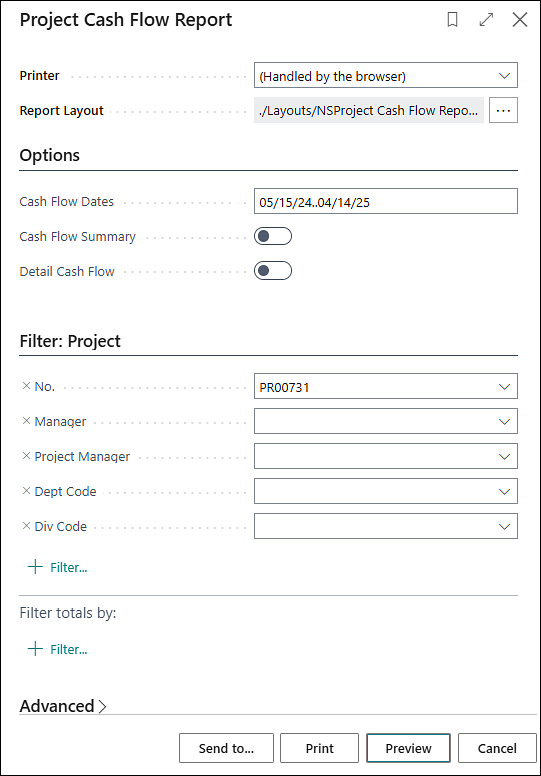
Note: The selected date range cannot exceed 12 months.
ADO-3616
New Feature – Explode Assembly BOM Item Process - Unit Costs, Prices, and Measures
Assembly BOM explosion has been enhanced to improve processing speed, costing consistency, and unit-of-measure control.
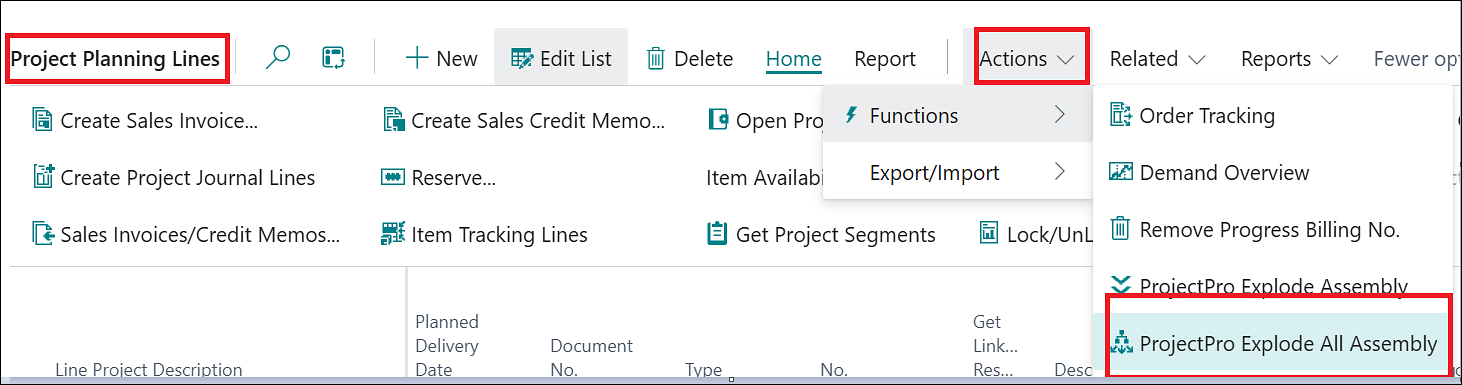
- Added “ProjectPro Explode All Assembly”, allowing users to explode all assembly items on Planning Lines in a single action.
- Added “Use Build Takeoff Cost During BOM Explosion” in Projects Setup. When enabled, BOM explosion uses the saved Build Takeoff Cost instead of recalculating component Standard Cost.
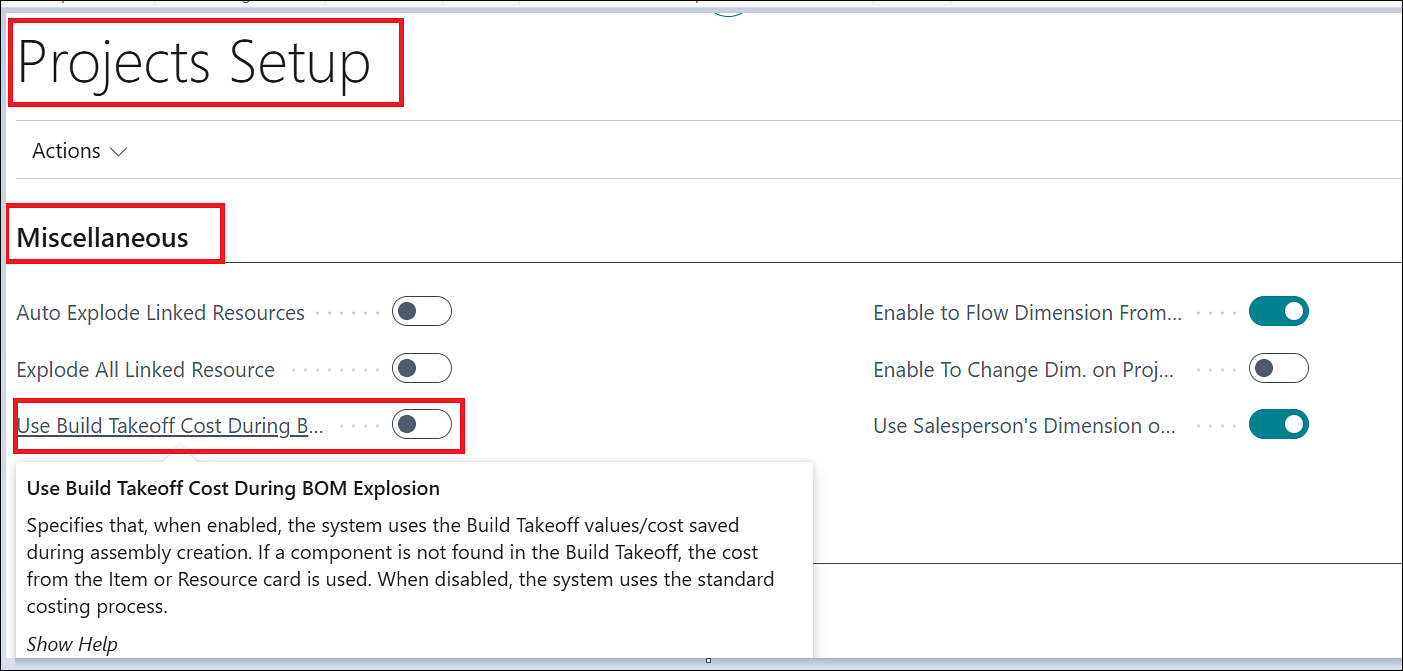
Note: The default behavior remains the existing standard-cost calculation.
- Made BOM Component’s “Unit of Measure” mandatory on the Assembly BOM page.
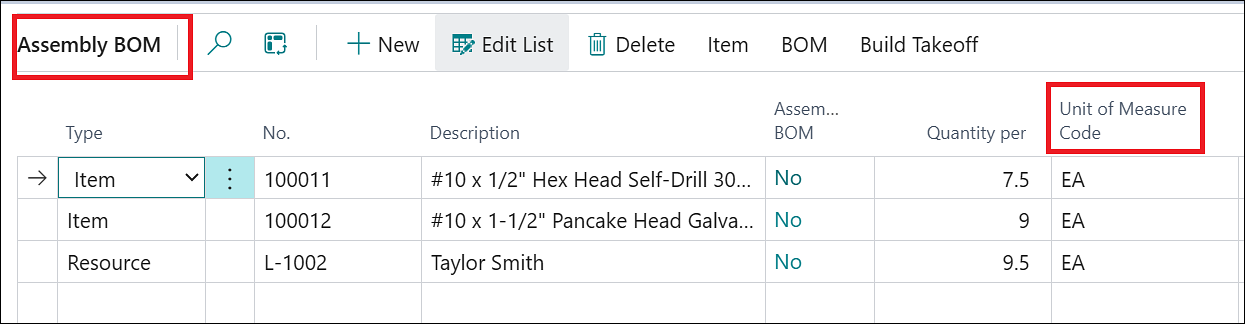
- BOM calculations now retain and use the specified BOM Component UOM during the explosion process.
ADO-3743
New Feature – Assembly BOM - Add “Project Task” to the Component Levels
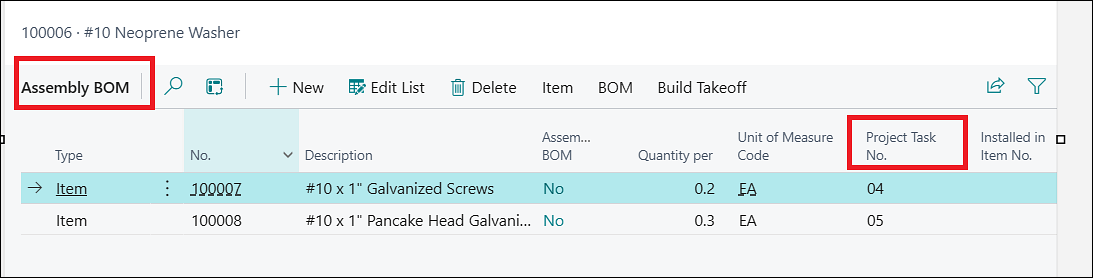
A new enhancement has been introduced to allow users to assign Project Task No. at the Assembly BOM Component Level. During BOM explosion, the system uses the assigned Project Task No. to create the corresponding Project Planning Lines.
A new “Project Task No.” field has also been added to the Assembly BOM page to support this functionality.
ADO-4496
New Feature – New “Billing Amount” Field on Progress Billing Line
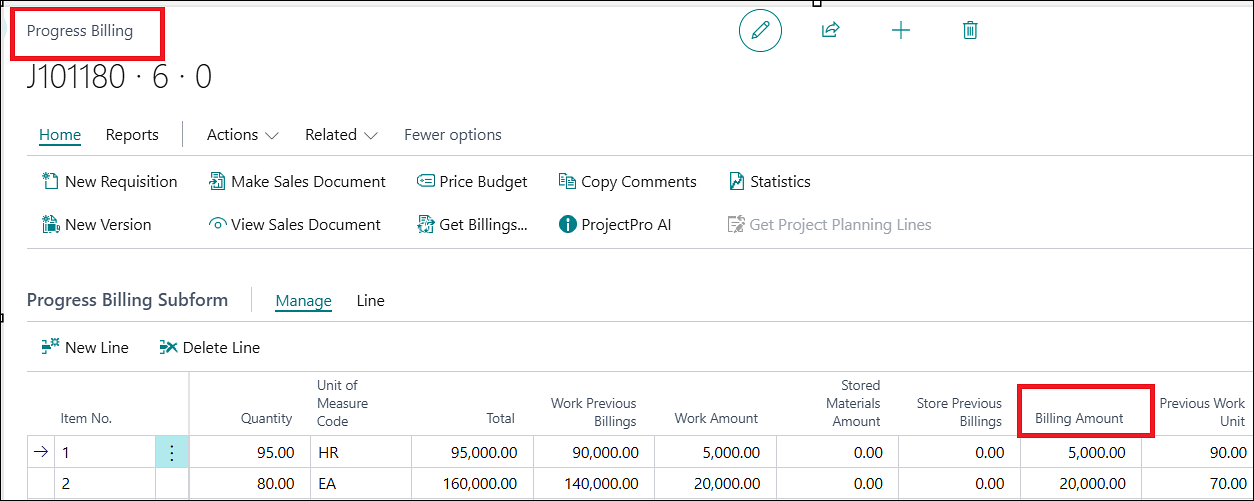
A new “Billing Amount” field has been added to the Progress Billing Subform. The field automatically displays the current billable amount based on the applicable project billing values. This is created in order to have the information of the amount to be billed on the Sales Invoice before creating one.
ADO-4587
Enhancement – PFW – “Amt. Recd. Not Invoiced” Column with “Receipt on Invoice” Option
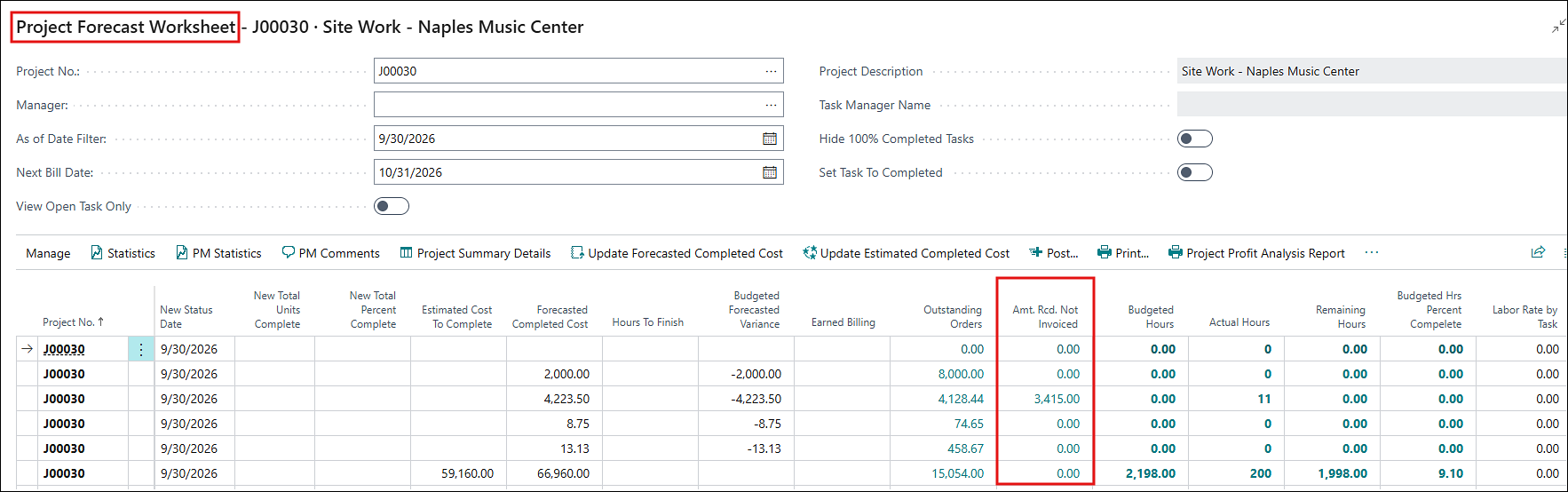
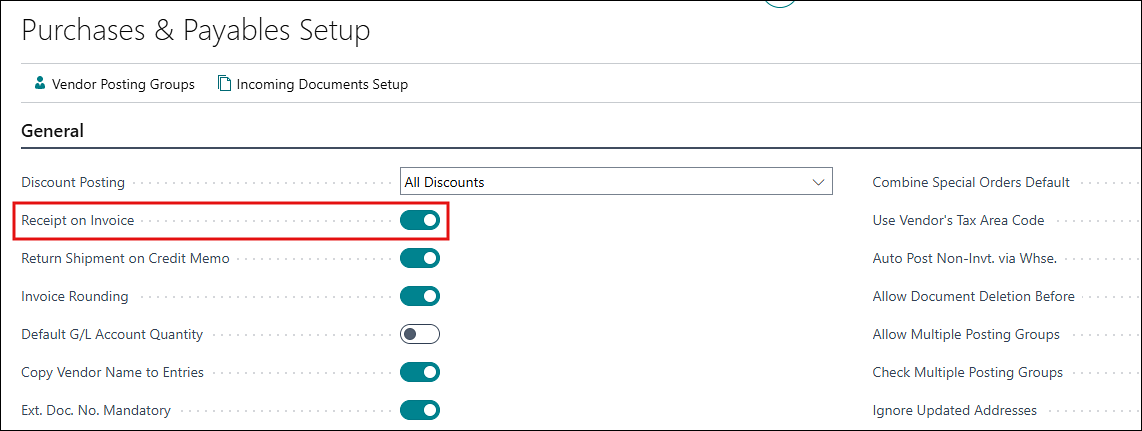
The “Amt. Recd. Not Invoiced” column on the project forecast worksheet now shows the correct value when only an invoice is posted with the “Receipt on Invoice” Boolean enabled in Purchase & Payables Setup.
ADO-4547
New Feature – Purchase Order Accrual Project Cost - Resource Entries
A new Resource Cost Accrual functionality has been introduced to recognize project costs at the time of Purchase Receipt Posting.
The following setup options have been added:
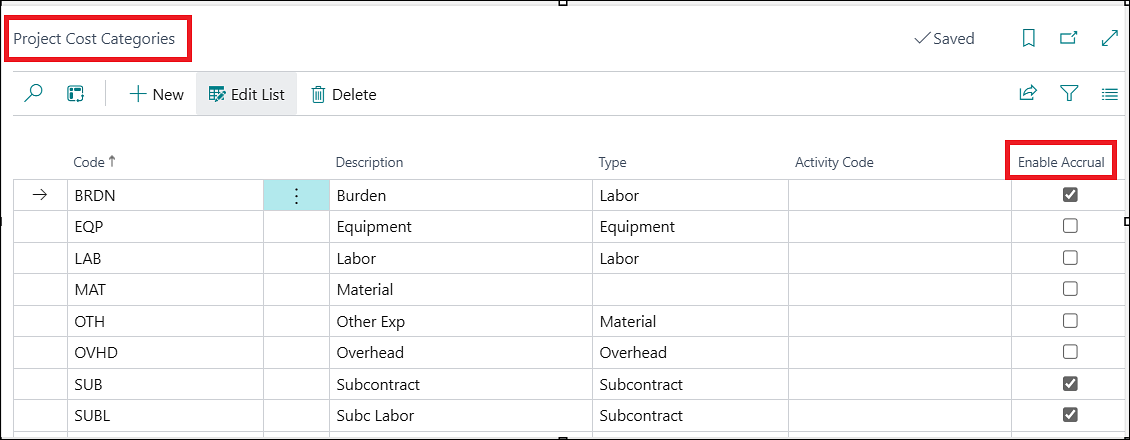
- “Enable Accrual” is added on the Project Cost Categories page to control whether accrual is applicable for the cost category.
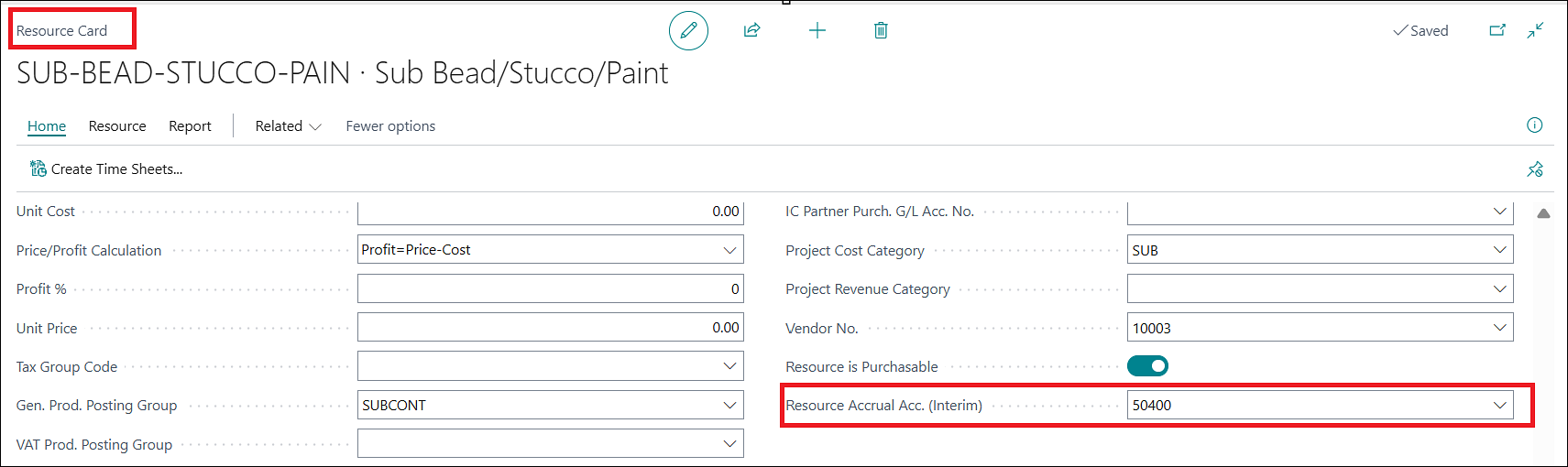
- “Resource Accrual Account (Interim)” is added to the Resource Card to define the interim G/L account used for resource cost accrual.
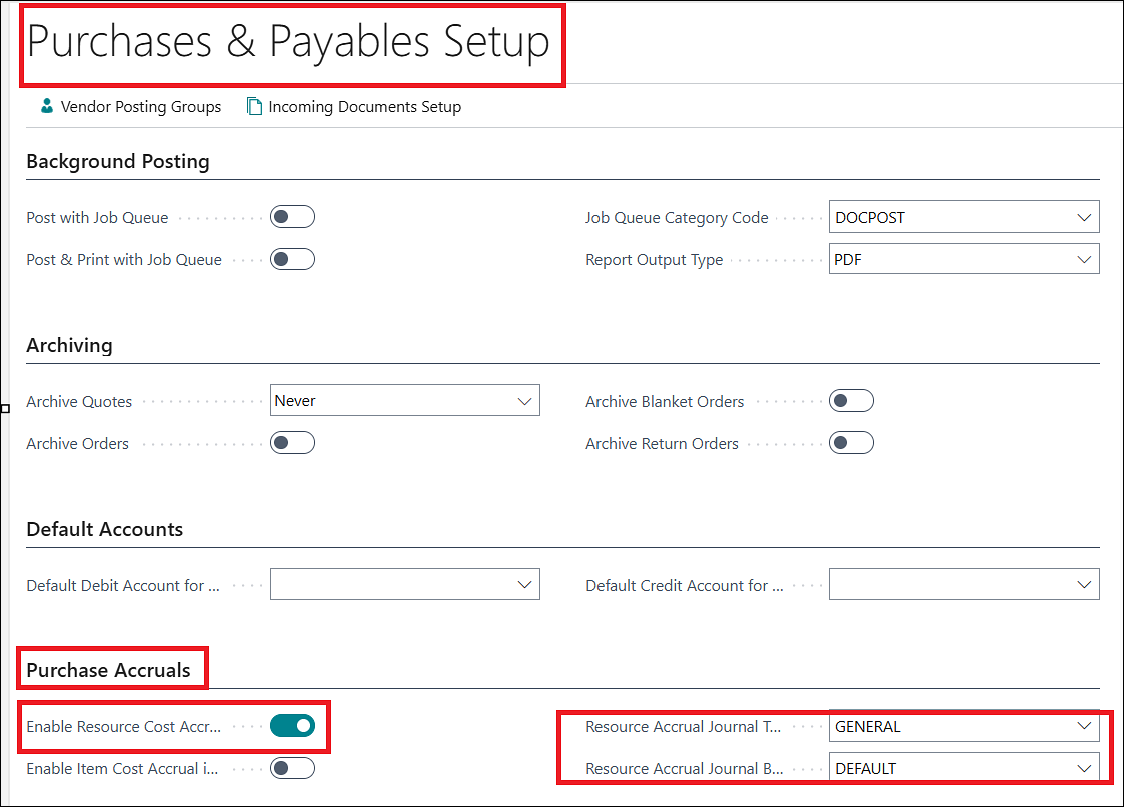
- “Enable Resource Cost Accrual” setup is added on the Purchases & Payables Setup to enable the accrual functionality.
- “Resource Accrual Journal Template and Batch” is added on the Purchases & Payables Setup to define the general journal template and batch used for generating accrual entries.
When the required conditions are met, the system automatically creates the Project Ledger Entry and related G/L Accrual Entries during Purchase Receipt Posting.
Resource cost accrual is processed when all the following conditions are satisfied:
- Purchase Line Type = Resource
- Resource Cost Accrual = Enabled
- Cost Category Accrual = Enabled
- Resource Accrual Account (Interim) is specified
ADO-4497
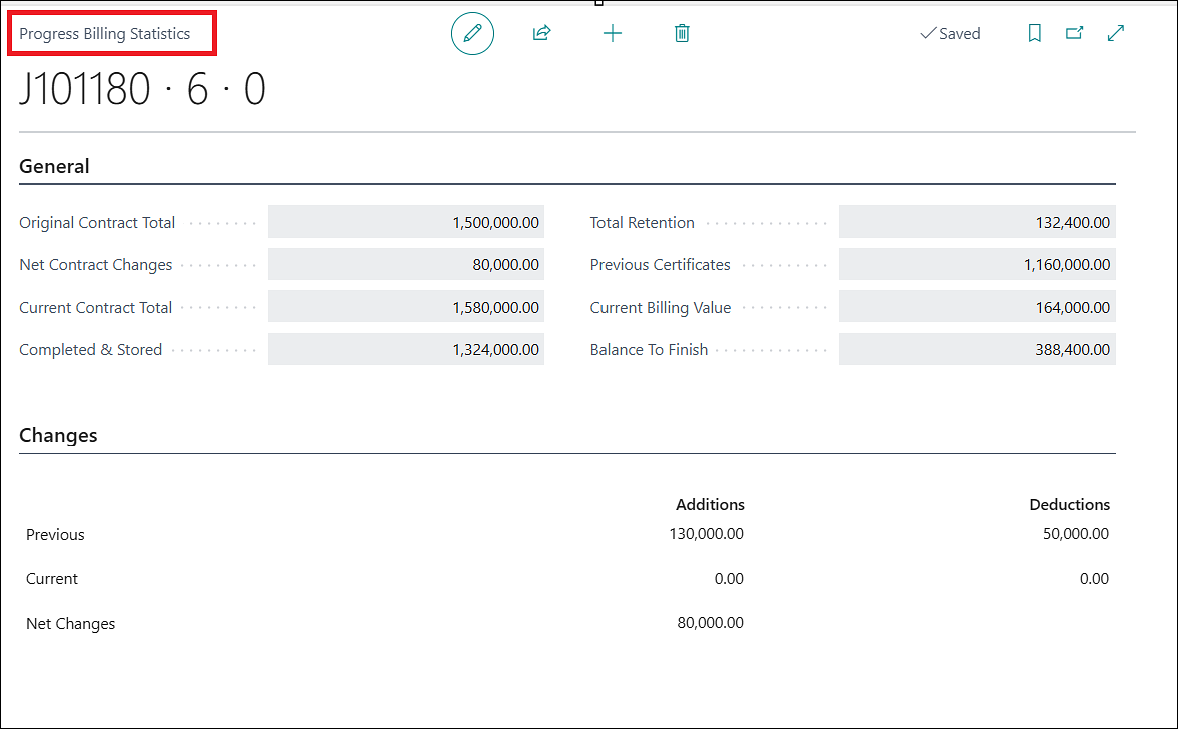
New Feature – Enhance Progress Billing Statistics
A new enhancement has been introduced to automatically calculate and display Progress Billing Statistics within the Progress Billing process.
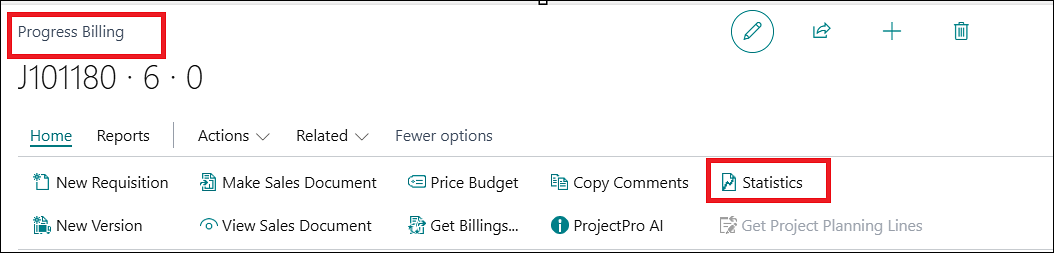
The statistics provide users with a consolidated view of key billing information during progress billing activities.
ADO-4855
Enhancement – Enhancement to Calculate Budgeted and Actual Hours Using “Labor” Cost Category Only.
The “Update Cost Category Batch” has been enhanced with additional filtering options for Project No. and Project Status.
You can now update Cost Categories for selected projects based on the specified project number and status criteria.
ADO-4837
Enhancement – G/L Selection on PMP
G/L Account selection on PMP has been improved and tied to the “Expanded Project Material Planning” setup in Project Setup.
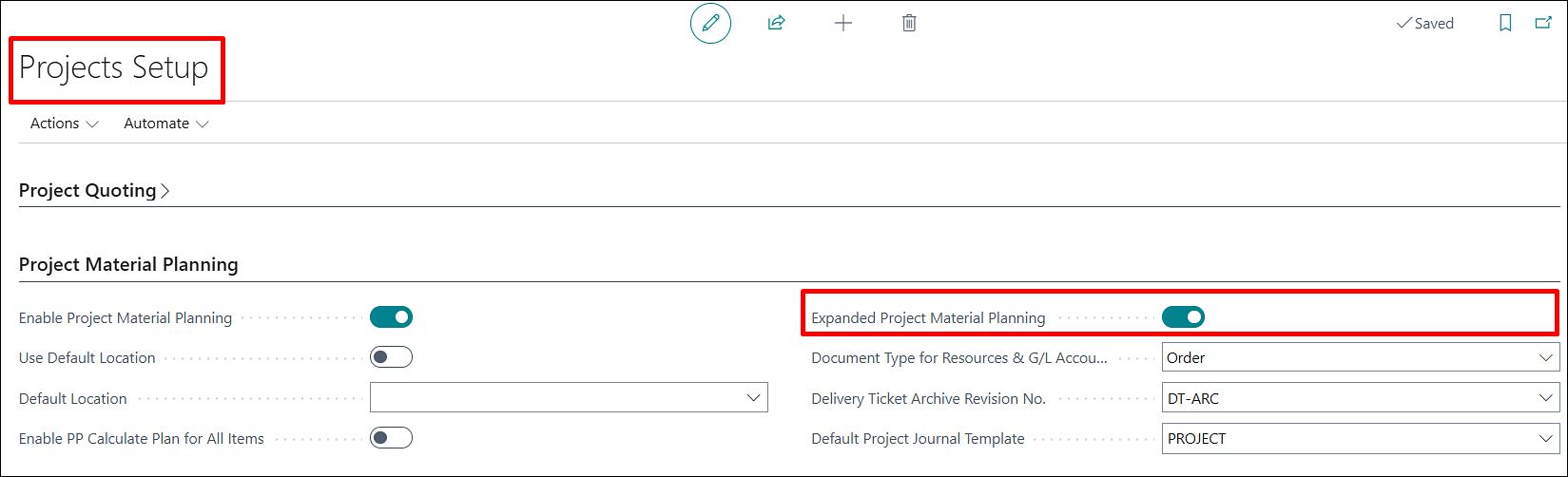
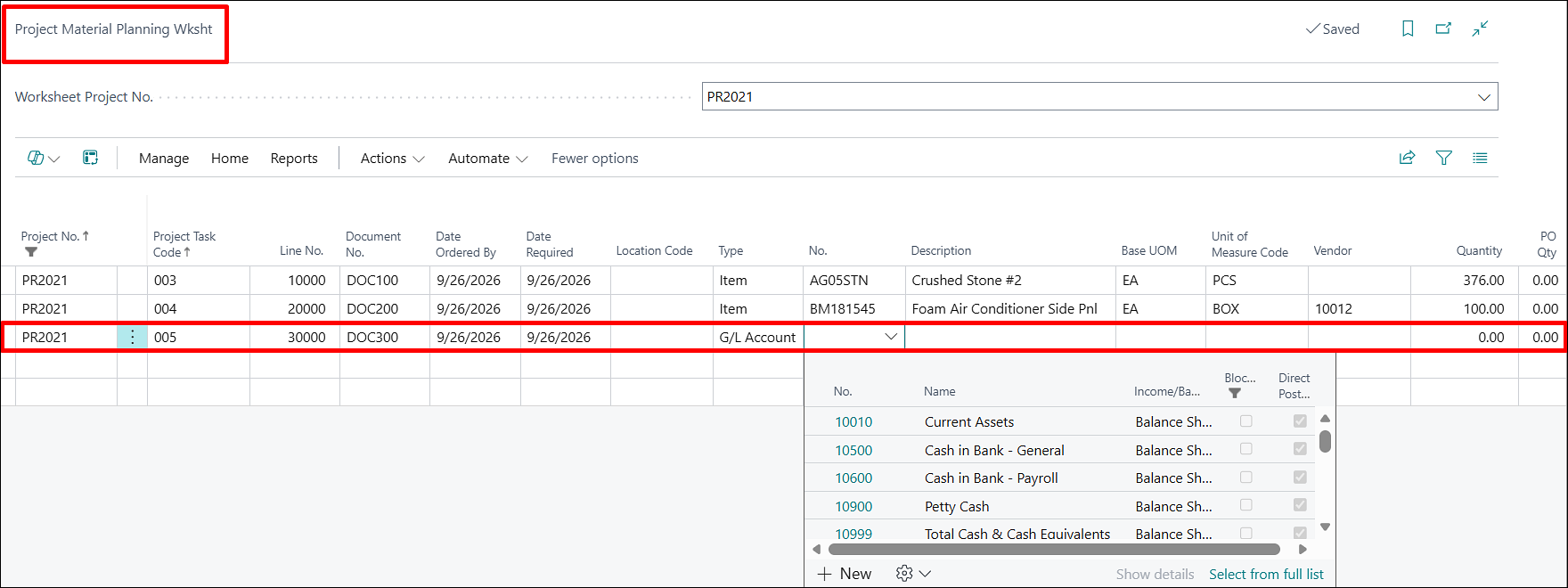
When the setup is disabled, the system prevents selection and shows a clear setup message.
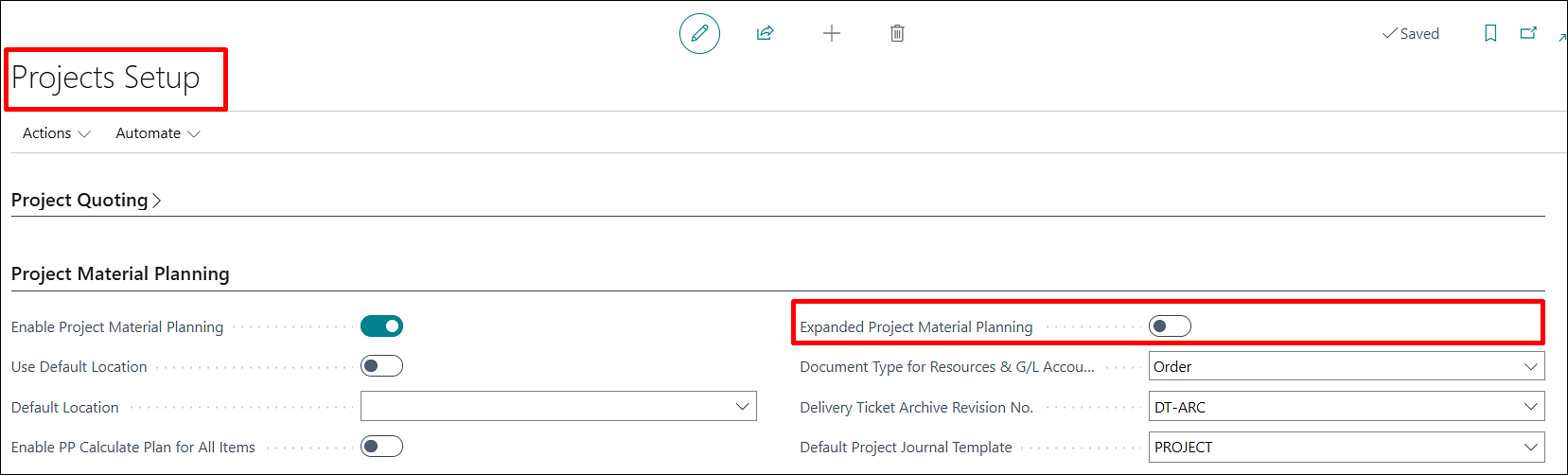
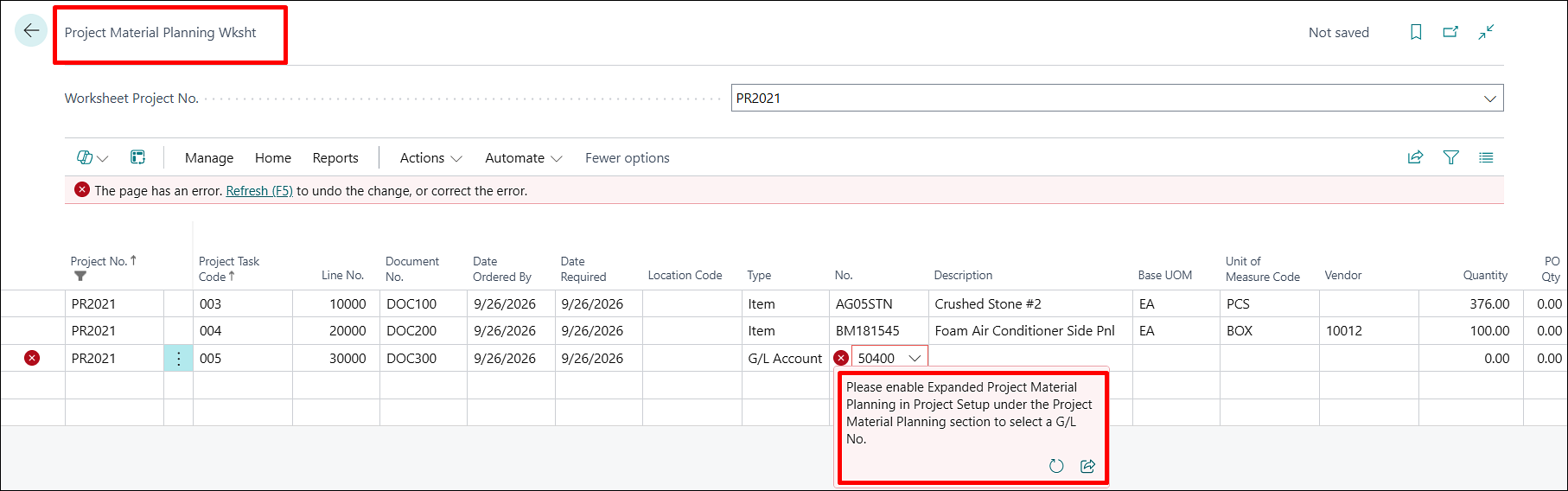
The “Type” option was refined by removing “Resource Group” from PMP lines.
This enhancement also addresses the cost updating for manually added Resource lines on the Project Material Planning (PMP) page. The cost is now derived from the “Unit Cost” field instead of the “Usage Cost” field, ensuring the displayed resource cost reflects the applicable unit cost.
ADO-4866
Enhancement – UI Changes – Projects Setup & Project Card
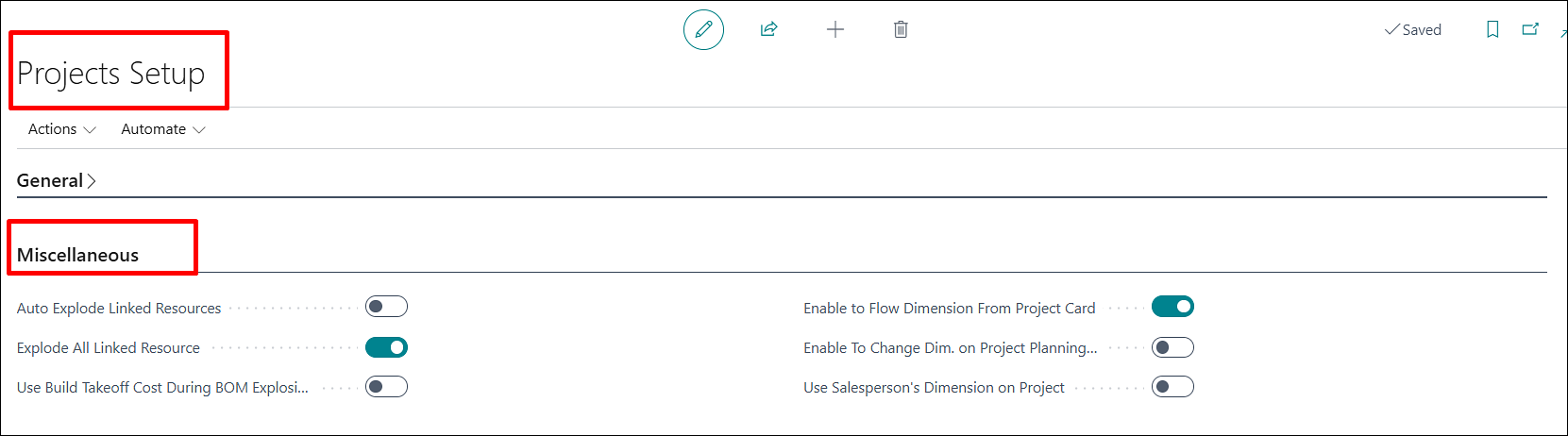
The Item and Resource fast tab is renamed to Miscellaneous on the Projects Setup, and dimension-related setup fields are moved here.
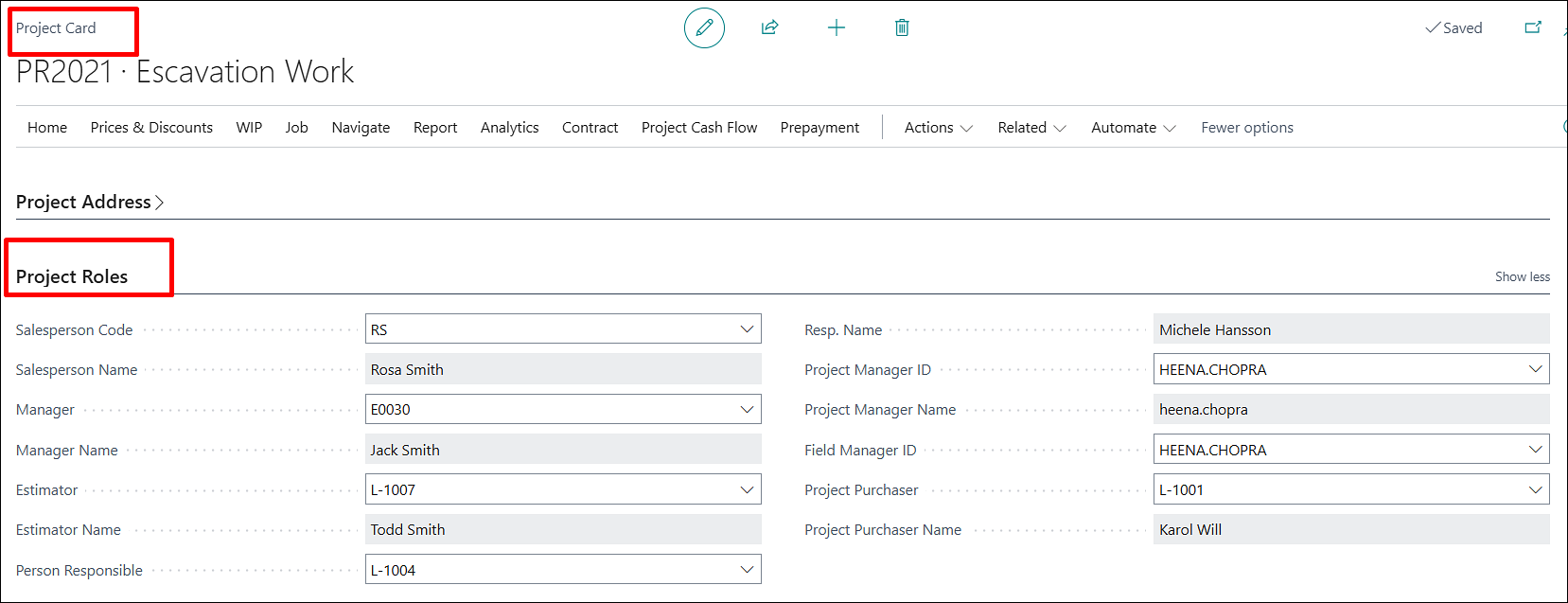
Project Role fields are now grouped in a separate Project Roles fast tab on the Project card (earlier present on the General fast tab).
Tooltips and captions are refined, including role fields such as Salesperson, Manager, Estimator, and Project Purchaser.
ADO-4861
Enhancement – Enhance “Posted Project Sales - Invoice” Report (R_14021225)
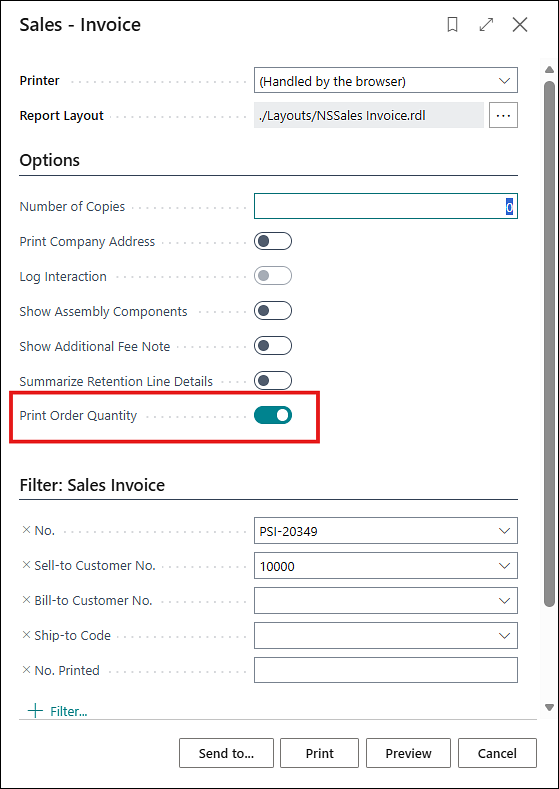
The “Posted Project Sales – Invoice” report has been enhanced with the updated layout. The “Order Quantity” field, which was previously included in the report, is now available as an optional setting on the request page. When enabled, the Order Quantity will be displayed on the report.
ADO-4933
New Feature – MS - Major Release Changes – W1 (Preview Version 29)
The ProjectPro W1 app is now compatible with the latest BC Preview Version 29.
ADO-4987
Enhancement – Burden Calculation with Negative Amount and Reversal
The Burden amount now also gets calculated when a reversal for a usage entry is either posted from the Project Journal with negative amount or through a Purchase Credit Memo.
ADO-4773
Enhancement – ProjectPro APIs Changes
The following fields have been added to all APIs:
- System Created At
- System Modified At
ADO-4460
Improvement – Remove Obsolete Fields from Project Related Pages and Setup
This backlog was already released in Global Build 28.0.3.50931; however, one field was not included as expected. The backlog was released again to ensure the missing field is properly included.
ADO-4655
Improvement – Sub Project Task Creation with Master Project Dimensions
Task creation on a sub project now works correctly when the master project and customer have default dimensions.
You can now create sub project tasks without being blocked by dimension-related validation.
ADO-4761
Improvement – “Project Task Summary” Page for Missing Sub-Level Task Code
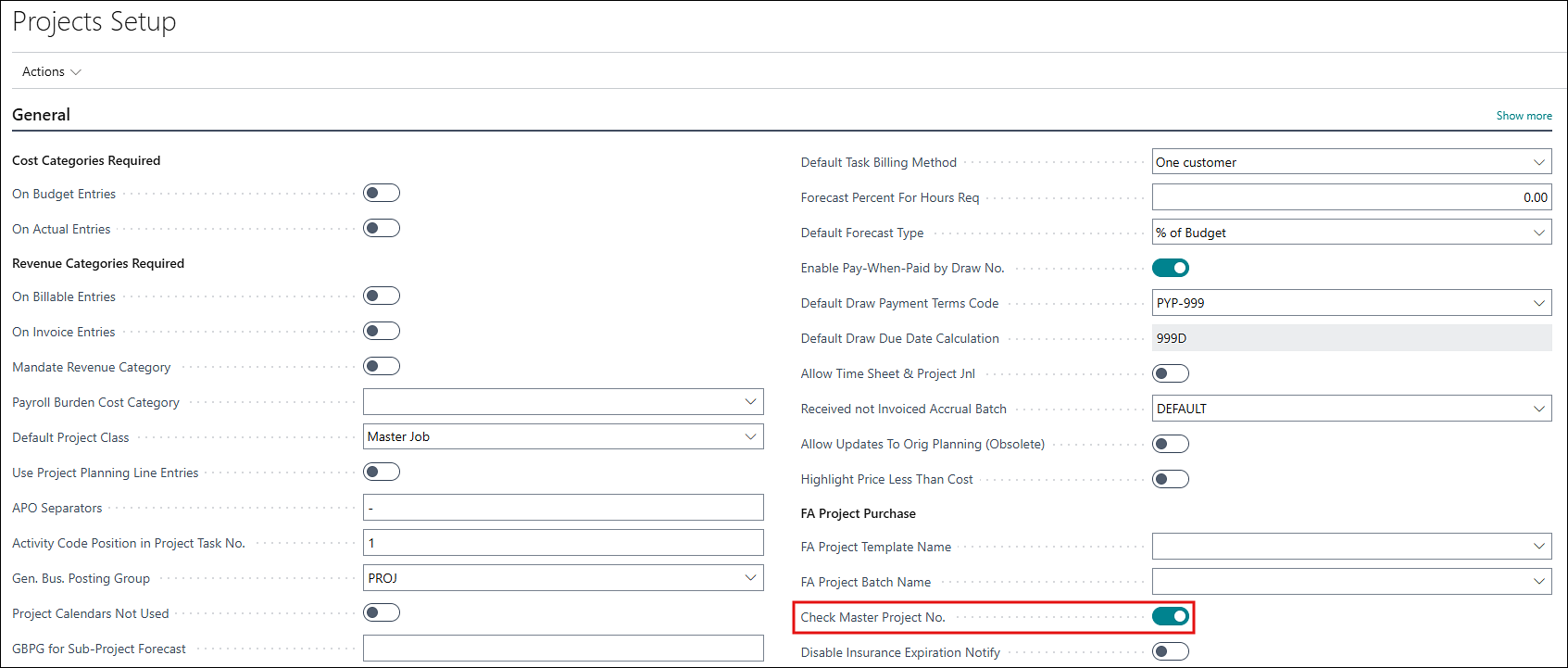
When “Check Master Project No.” is enabled on the Projects Setup, the system asks for adding the missing sub-level task codes to the master project if clicked on “Project Task Summary” from the Analytics section of the project card.

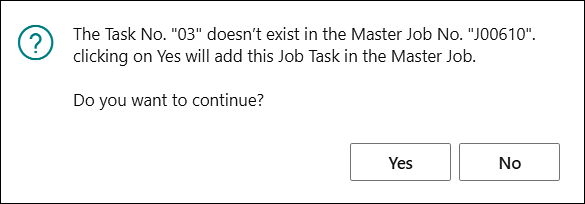
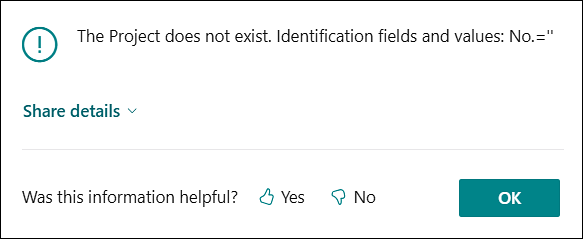
If clicked on No, the system used to give an error as below. This is now resolved.
ADO-4764
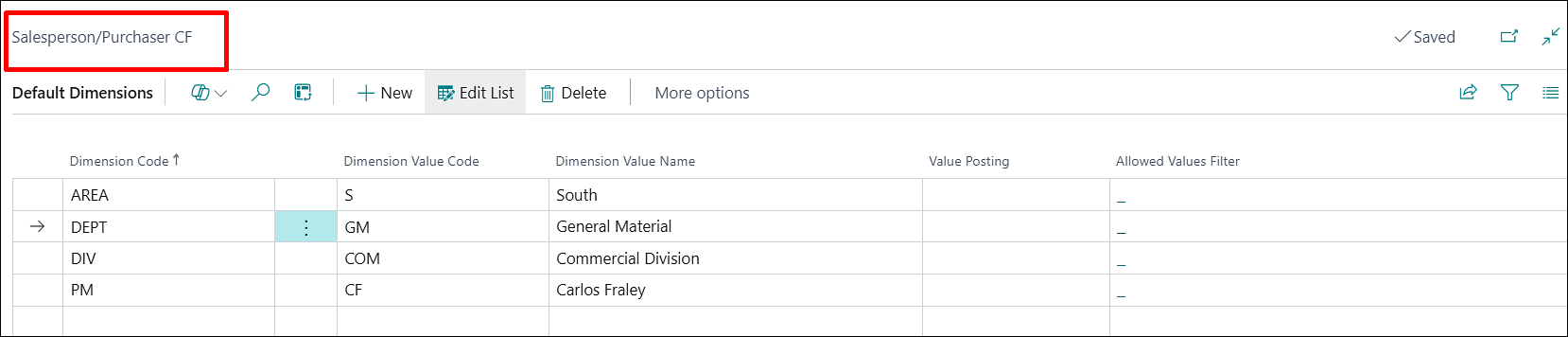
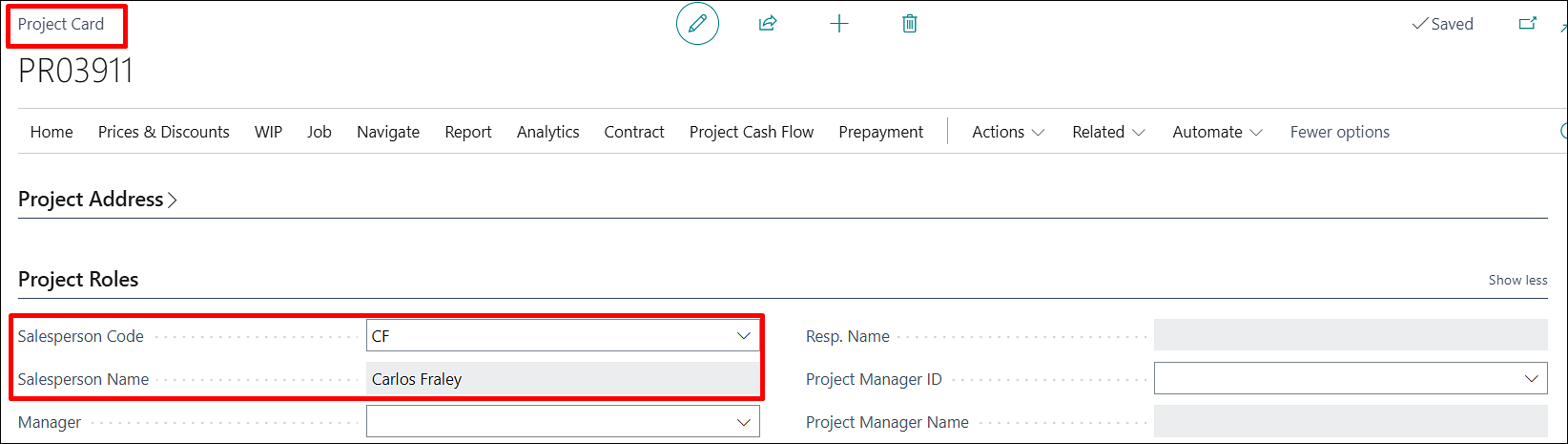
Improvement – Salesperson Dimension Validation Overwrites Project Dimensions
A new “Use Salesperson’s Dimension on Project” option has been added to Project Setup to control whether salesperson dimensions flow to projects and related transactions.
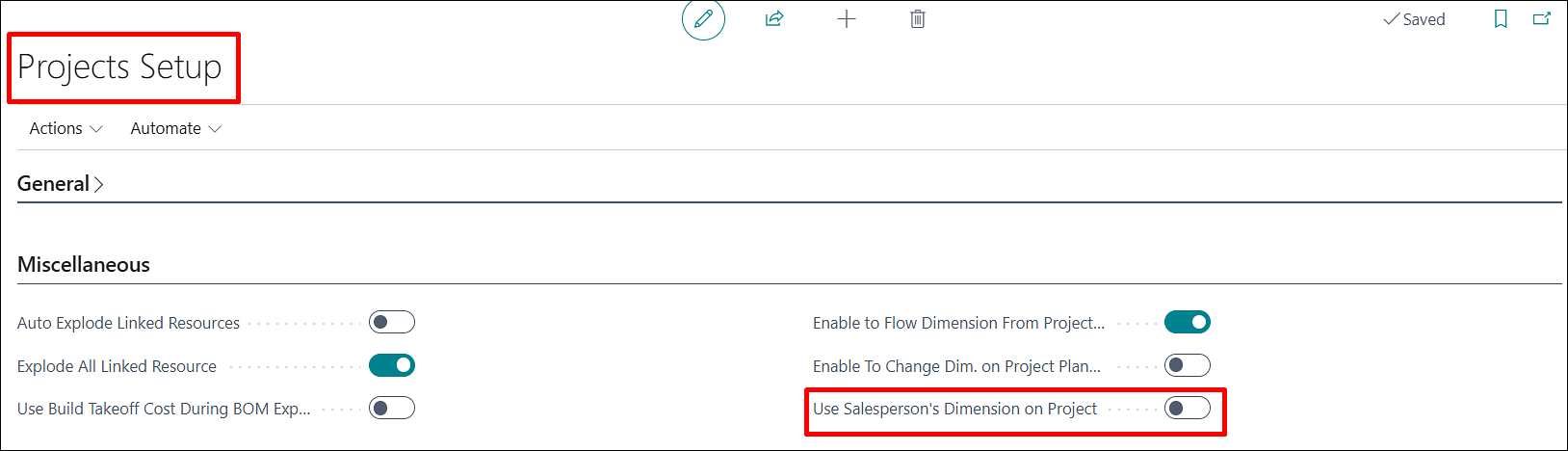
This gives customers better control over Division, Branch Location, and other project dimensions while protecting integration-supplied values.

ADO-4778
Improvement – PMP Report Execution – Error While Running Report
The “Print Project Material Worksheet” report can now be run directly from the PMP page, supporting material planning and project review activities.
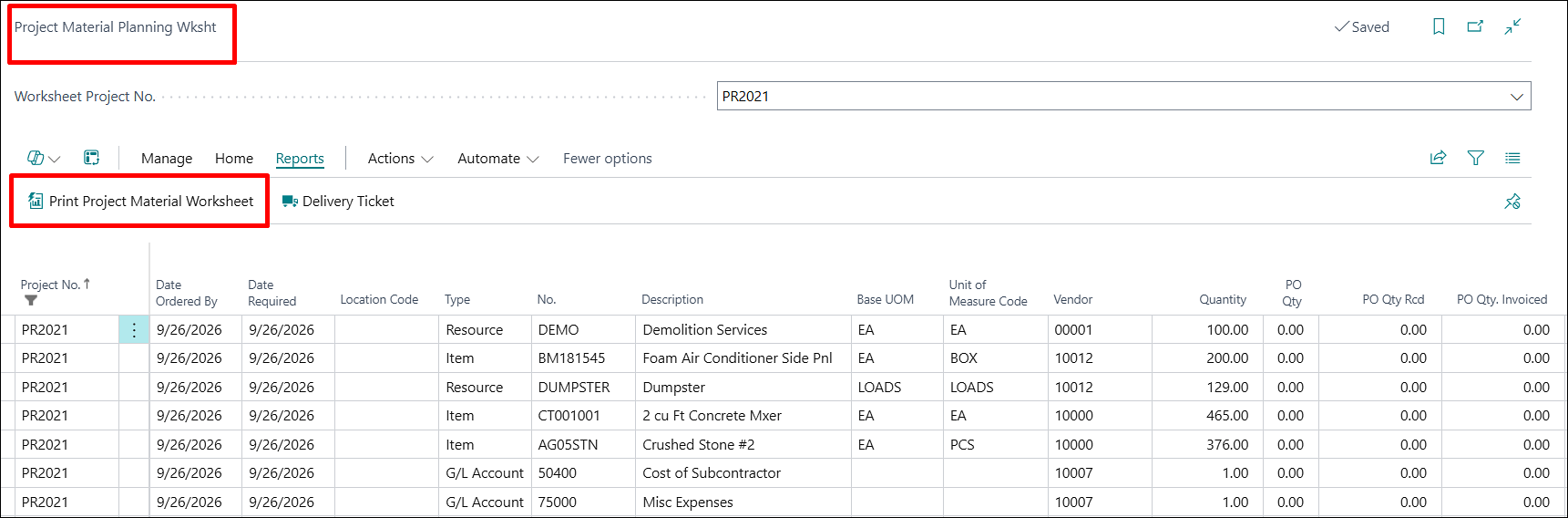
The report execution works as expected, allowing users to access the required reporting information without interruption.
ADO-4885
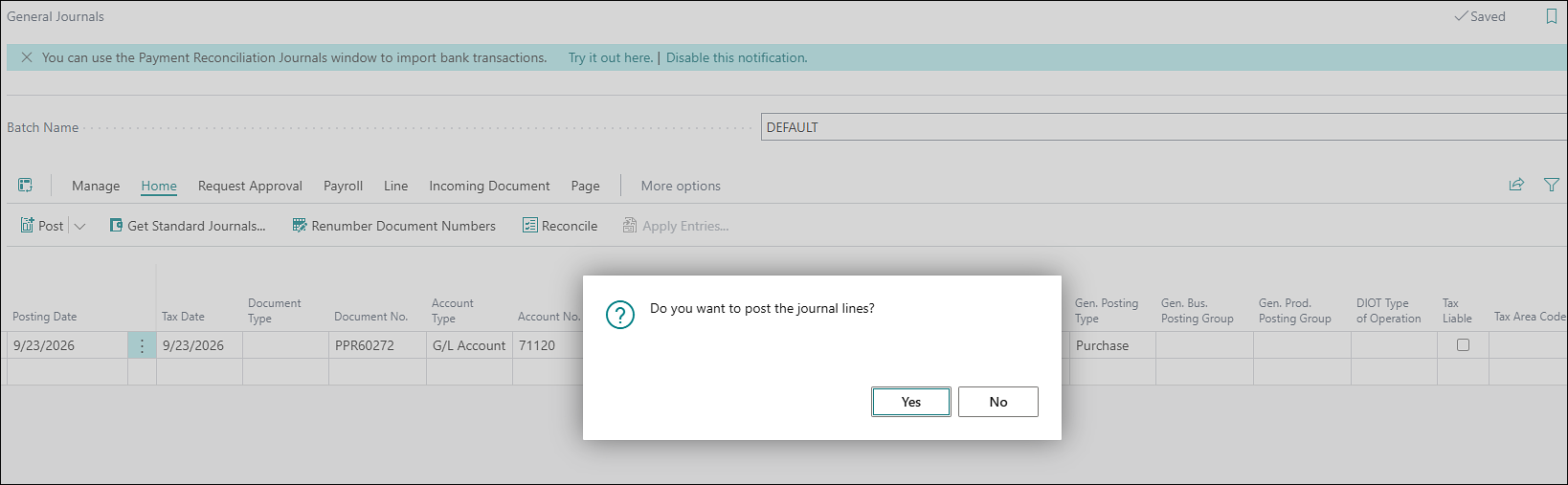
Improvement – General Journal’s Posting Confirmation Message
The confirmation message “Do you want to post the journal lines?” now appears while posting the General Journal entry. This was conflicting with the Labor to G/L auto post process, which is now resolved.
ADO-4910
Improvement – Populate Project Cost Category on Project Journal Line
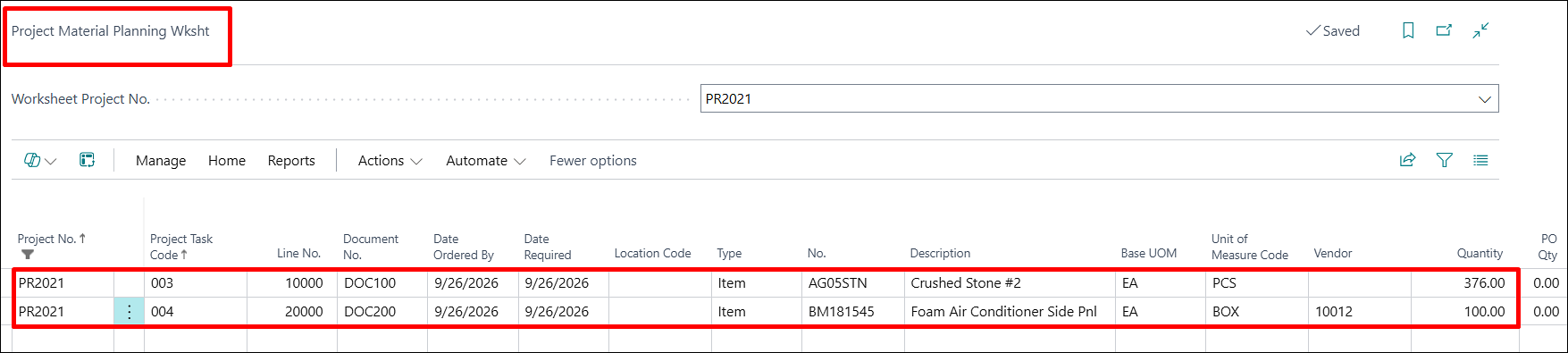
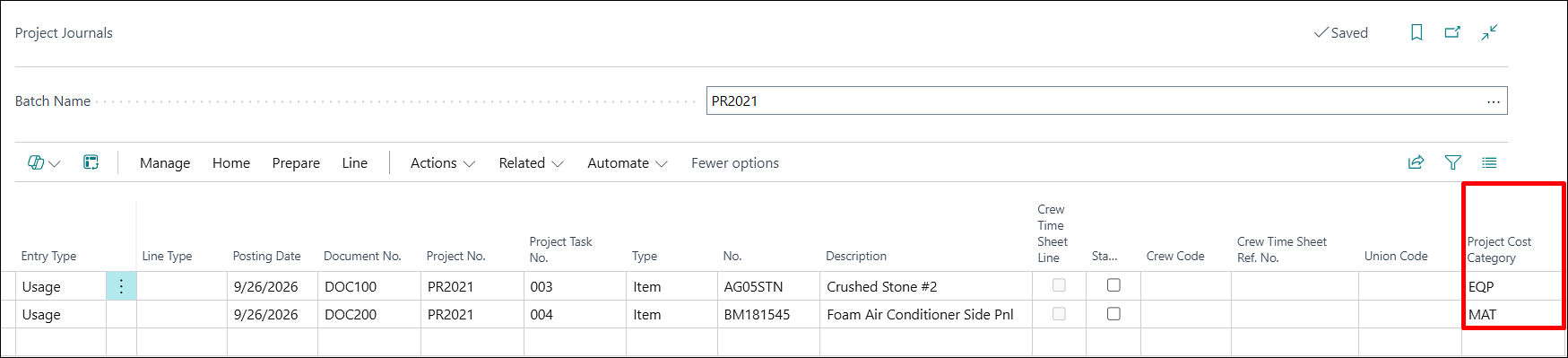
The “Create Project Journal” action on the PMP page was enhanced to populate Project Cost Category automatically.

When the PMP line is linked to a Project Planning Line, the cost category is copied from that planning line.
When no planning line is linked, the cost category is taken from the Master Item Card.
ADO-4915
Improvement – PO Status Reopens When Retention is Applied
Purchase Order’s field “Status” behavior has been enhanced to maintain the expected release status after posting, including scenarios involving retention.
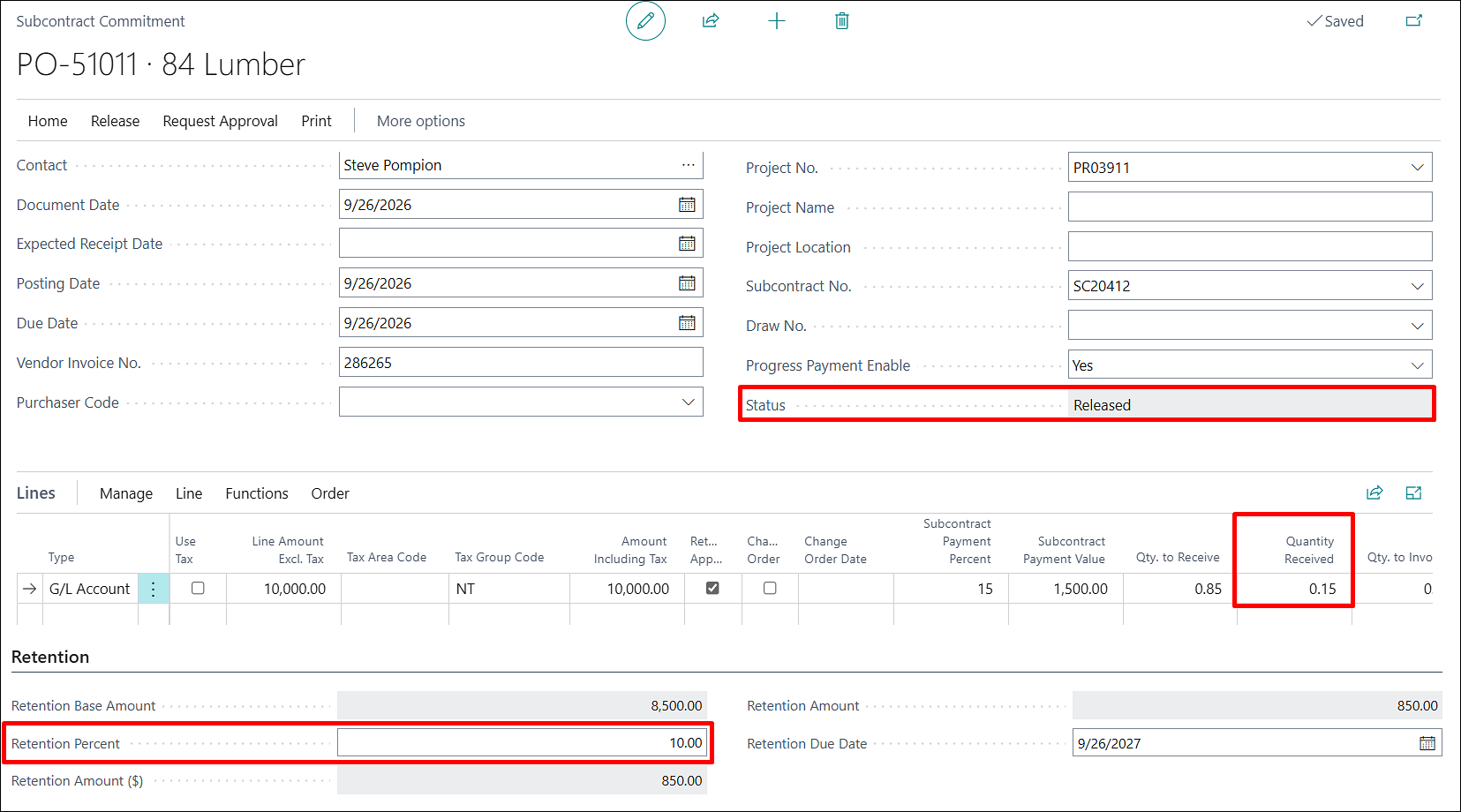
Previously, posting a partial purchase with retention could cause the Purchase Order status to automatically change back to Reopen.
The updated behavior keeps the Purchase Order status aligned with its expected state throughout the purchase process.
ADO-4924
Improvement – PMP Report – Caption Renaming and Layout Correction
The “Print Project Material Worksheet” report layout was corrected to use ProjectPro terminology consistently.
Report captions were renamed from Job-based wording to Project-based wordings, including Project No., Project Name, Project Description, and Manager.
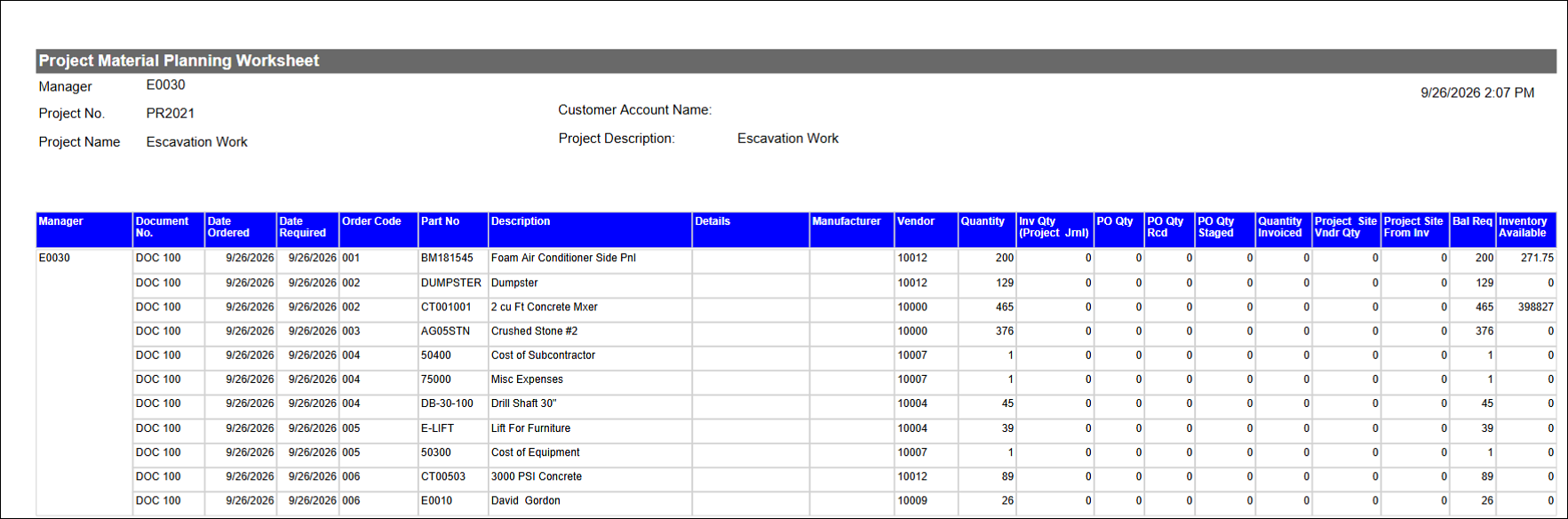
An extra blank row was removed from the line section to make the report cleaner.
ADO-4678
Hot Fix – Option for Copying Tasks when Creating Change Orders
While creating Change Orders through a project, the system asks whether to copy the master project’s tasks. If you choose No, the tasks are now not copied.
ADO-4905
Improvement – Project Journal Entry with “Work Type” Resets to Zero Cost with “Resource Group” in Sales Price
The cost on a Project Journal line used to reset to zero when the selected Resource belonged to a Resource Group with prices and costs defined in the Price List. Costs can now be updated correctly on Project Journal lines.
ADO-4950
Improvement – Project Sales Price Conflict with PO Posted for G/L in Project Ledger Entries
If a “Project Sales Price” line is added/exists for a “G/L Account,” then, when creating a purchase order, the PO G/L line cost conflicted with the sales price resource line. Resulting in:
- Even if the cost is added to the PO line manually or modified, then the posted entries for Project Ledger Entries would show 0 cost.
- This also impacted on the project planning lines being created, with or without markup%, upon posting the PO in case of a T&M project.
This has now been resolved, and the default cost is correctly being populated, along with the correct ledgers being posted.
ADO-4884
Improvement – Progress Payment – Validate Requisition Date and Period to Date
Progress Payment processing was updated to validate required date fields before creating or sending related documents.
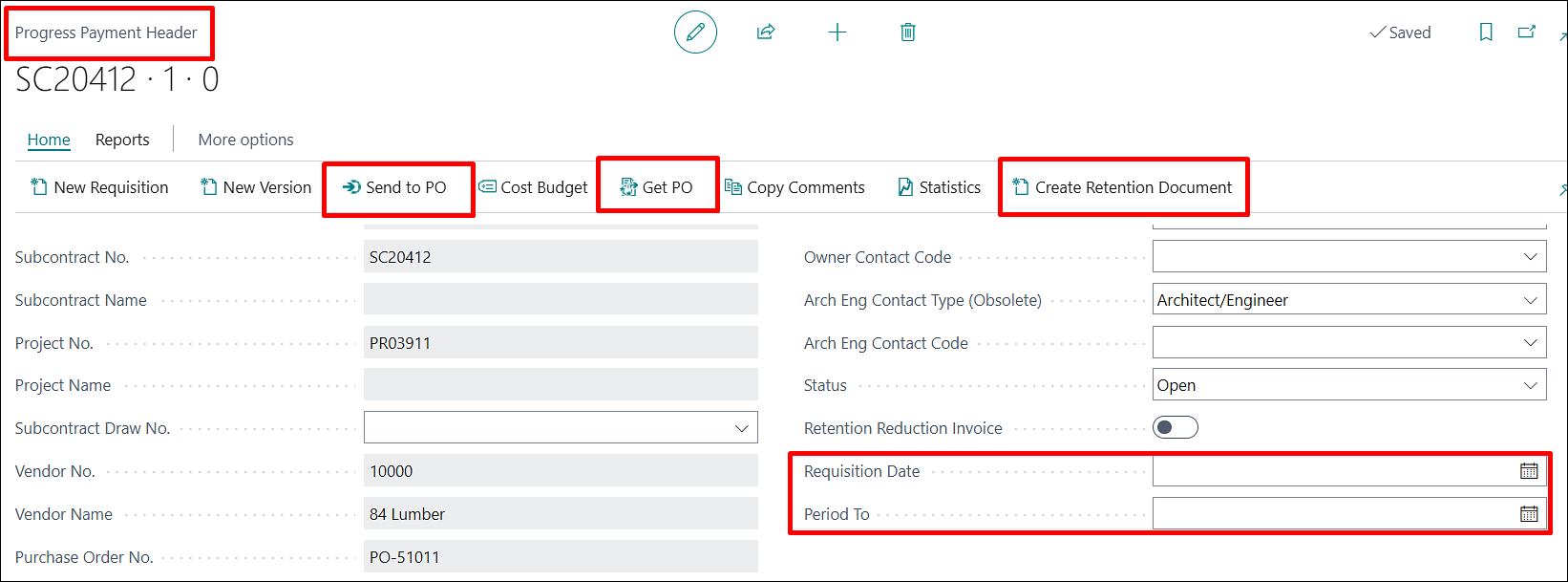
The system now prompts users when Requisition Date, Period To or both values are missing.
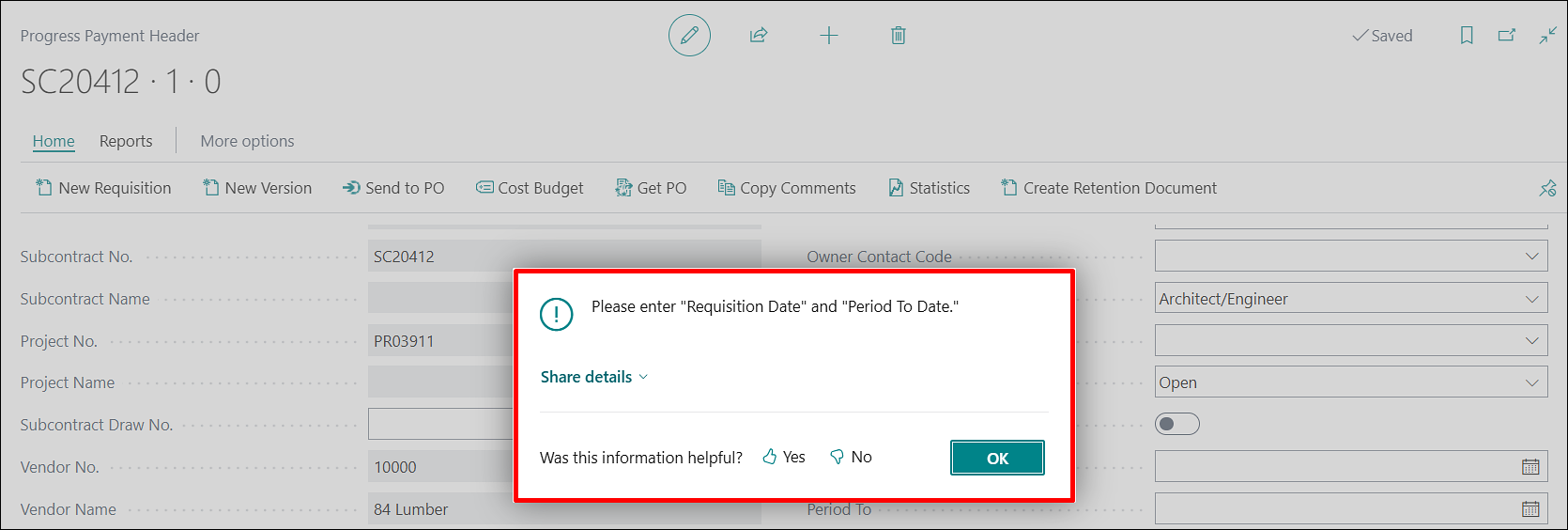
This prevents retention documents from being created with incomplete data that later causes the Progress Payment report to fail.
ADO-5060
Improvement – Sell-to Customer No. Change Confirmation on Project
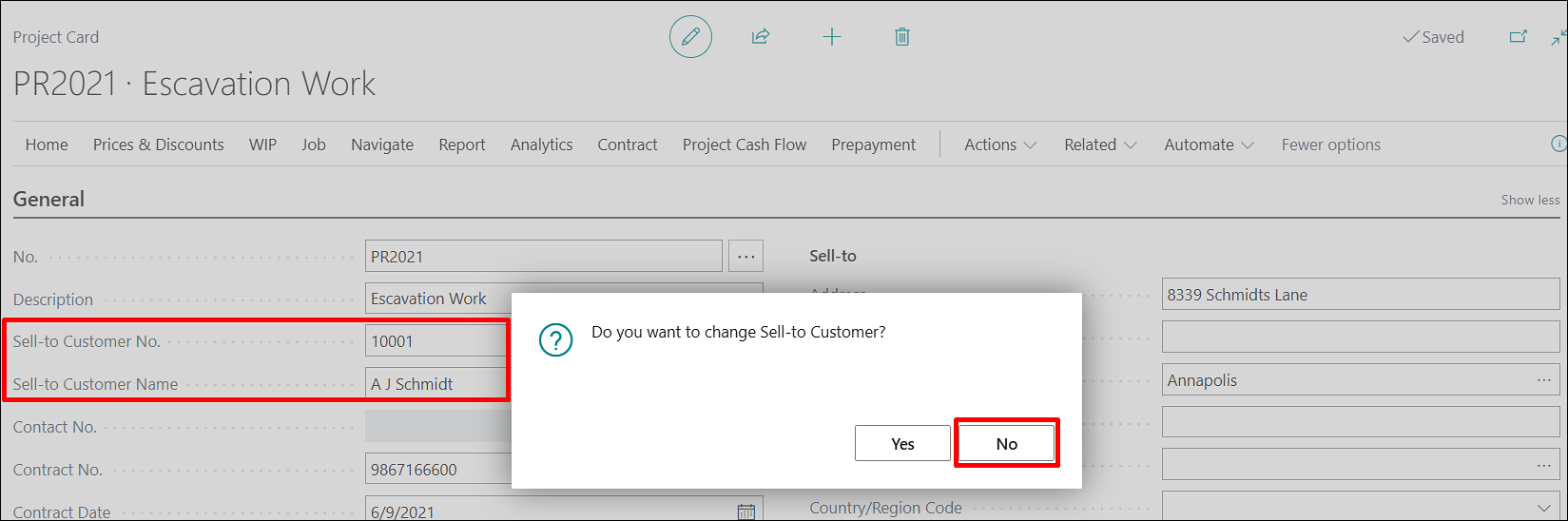
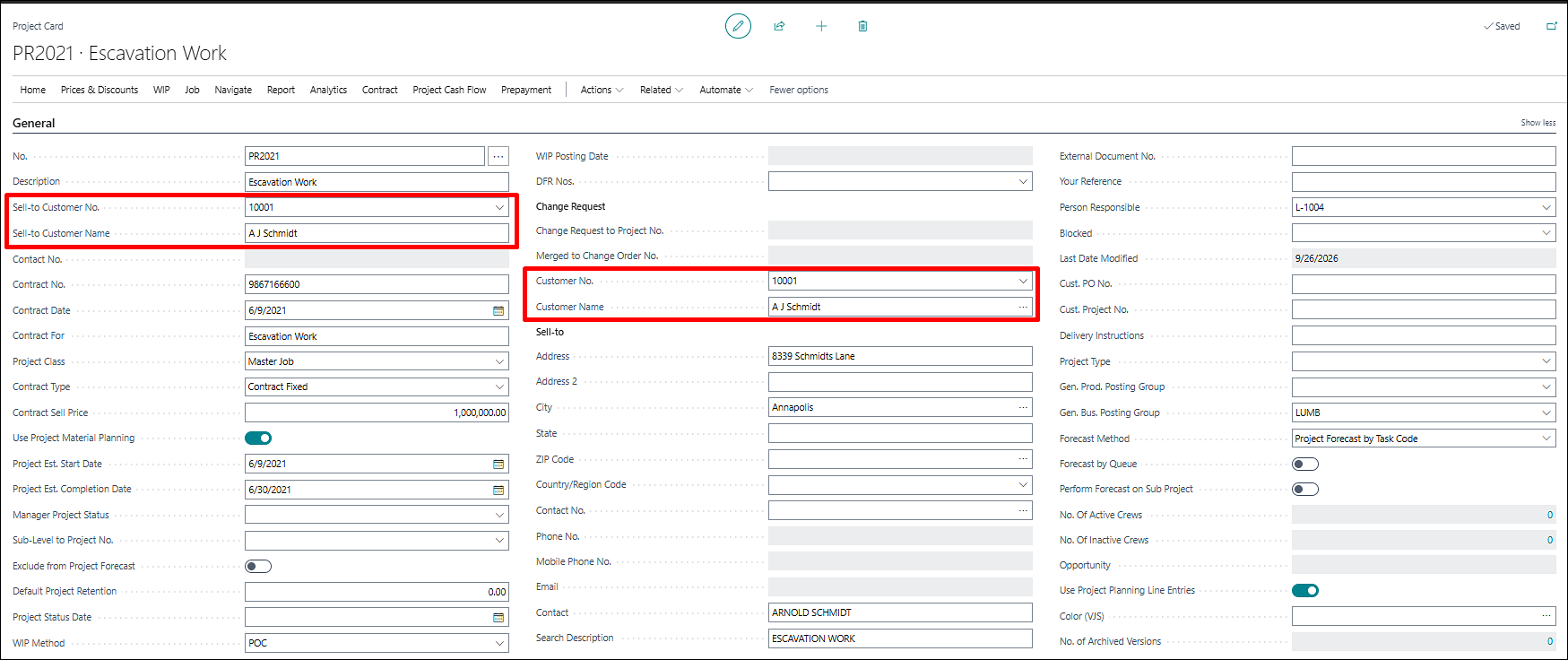
The project Sell-to Customer No. change process was corrected to handle the confirmation response consistently.
The update prevents inconsistent customer data by cancelling the change when the user chooses not to proceed.
ADO-5112
Improvement – Sales Credit Memo - Permission to Modify Customer Ledger Entry
Sales Credit Memo posting has been updated to correctly handle the required Customer Ledger Entry permissions in ProjectPro.
This allows users to post sales credit memos successfully even when using a customized permission set, without encountering permission-related errors.