Construction Timesheet Management Software | ProjectPro

All-In-One Construction Accounting Software

MANAGE TIMESHEETS FOR INDIVIDUALS AND CREWS

Track time, create billings, integrate with payroll

Book a Free Consultation

Manage Hours Worked and Labor Budgets

ProjectPro’s Timesheets feature allows users to record resource hours, sort entries by day, job, or resource, and copy timesheets across weeks. Users can complete their own timesheets in the 'My Timesheet' section and group past entries into batches. Rate tables can assign specific costs to resources per project.


Timesheet data supports up to two levels of authorization for accounting staff and project managers. Once authorized, entries can be transferred to payroll systems or third-party providers.

Award-Winning Construction Software
Created By Industry Experts

We know the construction industry challenges and we strive to make sure you achieve your project goals. We cut through complexity to give you the assurance and directions for your decisions, because we are here for the long term.

Award 1

Insights

Case study

Communication Solution Provider

This case study will help you understand how ProjectPro helped the client streamline financial reporting, and enhance project management and operations monitoring by offering real-time project performance visibility.

Read Case Study
Product Update
Learn About ProjectPro's Product Updates
Product Update

Got a Question?

Can I create Timesheets entries for non-job hours?
Yes, you can create Timesheets entries for service tickets, resource time without jobs, and Absence entries.
How can I make notes or comments on Timesheets entries?
Comments can be made for the whole Timesheets submittal or you can make comments on each time sheet entry.
Can I easily get to the Timesheets entry page?
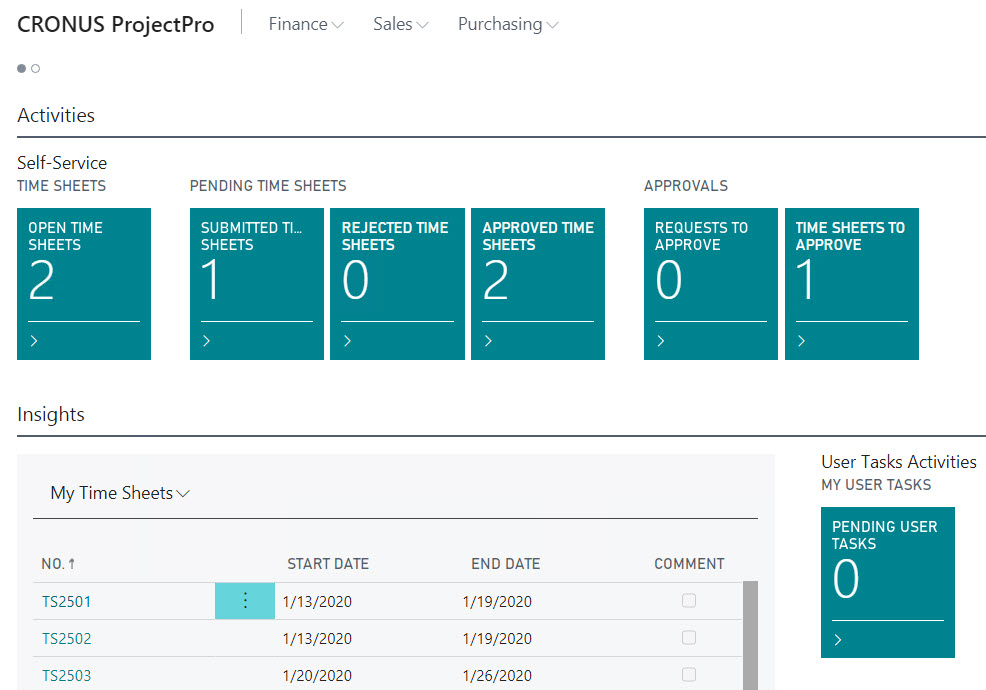
Yes, you can set your dashboard or role center page to default to Team Member for quick access to Open Timesheets, Submitted Time Sheets, and Pending Time Sheets.
If employee or resource is already scheduled for a job, can the Timesheets entries auto fill with hours?
Yes, you can populate your Timesheets with expected hours for Jobs and Job Task for the week.
Schedule a Demo